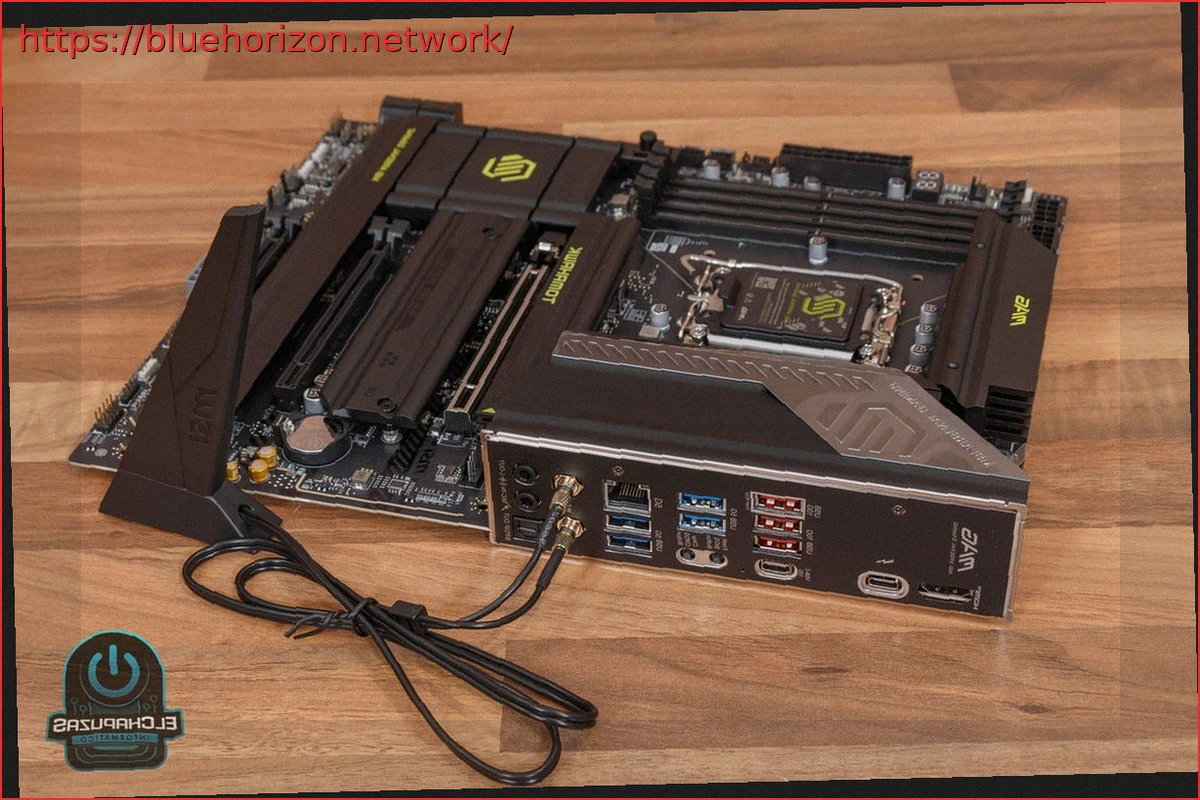
The MSI MAG Z890 TOMAHAWK WIFI II is an updated version that presents minimal differences compared to the original model, but it comes factory-ready with BIOS compatibility for the latest Intel 200S Plus processors. For these CPUs, it features a powerful 16+1+1+1 phase 90A SPS VRM and the Z890 chipset, ensuring extensive and varied connectivity in all aspects.

MSI MAG Z890 TOMAHAWK WIFI II Technical Specifications
| MSI MAG Z890 TOMAHAWK WIFI II | |
| Format | ATX (243.84 x 304.8 mm) |
| Socket | Intel LGA 1851 |
| Chipset | Intel Z890 |
| CPU Support | Intel Core Ultra 200S VRM 16+1+1+1 phase SPS 90A |
| Memory | 4 x UDIMM DDR5 up to 9,200 MT/s Dual-channel up to 256 GB Supports CUDIMM, Intel POR, and Intel XMP 3.0 |
| Expansion Slots | PCI_E1: PCIe 5.0 x16 (16 lanes to CPU, EZ PCIe Release) PCI_E2: PCIe 4.0 x16 (4 lanes to Chipset) PCI_E3: PCIe 4.0 x16 (4 lanes to Chipset) |
| Storage | M.2_1 PCIe 5.0 x4 (2280/2260, CPU) M.2_2 PCIe 4.0 x4 (22100/2280/2260, chipset) M.2_3 PCIe 4.0 x4 (2280/2260/2242, chipset) M.2_4 PCIe 4.0 x4 / SATA (2280/2260/2242, chipset) RAID 0, 1, 5, 10 support for M.2 NVMe Shield Frozr II Heatsinks 4 x SATA III (6 Gbps, RAID 0, 1, 5, 10) |
| Networking | Intel Killer E5000 5 GbE Intel Killer BE1750x Wi-Fi 7 up to 2.9 Gbps Bluetooth 5.4 |
| Audio | Realtek ALC1220P 7.1 Codec Audio Boost 4 2 x 3.5mm jacks (line out and microphone) + SPDIF |
| Rear Connectivity | 1 x Thunderbolt 4 (up to 40 Gbps, DisplayPort 2.1, PD 15W) 1 x USB-C 3.2 Gen2 (10 Gbps) 3 x USB 3.2 Gen2 (10 Gbps) 4 x USB 3.2 Gen1 (5 Gbps) 1 x HDMI 2.1 FRL |
| Internal Connectivity | 1 x USB-C 3.2 Gen2x2 (20 Gbps, PD 27W) 1 x USB 3.2 Gen1 Header (2 ports, 5 Gbps) 2 x USB 2.0 Headers (4 ports) |
| Lighting | Mystic Light |
| BIOS | CLICK BIOS X |
| Other Features | EZ Debug LED and EZ Digit Debug LED Rear Flash BIOS and Clear CMOS buttons MSI Center Software |
Packaging and Accessories
The motherboard comes in a gray cardboard box. The front provides limited technical information, while the reverse details its main features and specifications, including a diagram of the rear connectivity.


Inside the packaging, the motherboard is secured on a first level, protected by a cardboard frame and an anti-static bag, along with an additional box containing the Wi-Fi antenna. On a second level, the accessories are neatly arranged.


Among the accessories, a highlight is the Wi-Fi antenna with quick connectors and a magnetic base for easy attachment to the chassis. Also included are a cable to unify the connection of fans and LEDs for compatible liquid cooling, two SATA III cables, a key for adjusting M.2 slot sizes, and two screws for mounting M.2 drives. Unlike the original model, this version does not include a USB drive with drivers, which is one of the few differences between them.
MSI MAG Z890 TOMAHAWK WIFI II – Design and Connectivity
The MSI MAG Z890 TOMAHAWK WIFI II is an ATX format motherboard measuring 243.84 x 304.8 mm. Its aesthetic adheres to modern design trends with an all-black theme and subtle yellow accents in the MAG, TOMAHAWK, and MSI ARSENAL GAMING lettering on the heatsinks.

LGA 1851 Socket
At the top section of the motherboard is the LGA 1851 socket. This socket supports Intel Core Ultra 200S processors, including the new 200S Plus models, and remains compatible with cooling systems designed for the previous generation LGA 1700 socket.

Powerful 16+1+1+1 Phase 90A SPS VRM
Removing the pair of heatsinks covering the VRM, the MSI MAG Z890 TOMAHAWK WIFI II reveals a powerful 16+1+1+1 phase SPS power delivery system. It features 16 phases for the CPU voltage (Vcpu) rated at 90A each, and 3 additional phases for other components (SAPOWER, GTPOWER, and VNNAONPOWER). Unlike most models, the pair of 8-pin ATX/EPS connectors is located above the RAM slots rather than in the top right corner, which has little to no practical influence.

Compatible with DDR5 Memory up to 9,200 MHz
As is customary, four UDIMM slots for DDR5 memory are found in the top right corner of the motherboard. These support up to 256 GB of memory in a dual-channel configuration, compatible with CUDIMM modules and Intel POR and Intel XMP 3.0 technologies. One of the innovations with the new Intel Core 200S Plus CPUs is a new memory controller that natively supports 7,200 MT/s memory. However, the MSI MAG Z890 TOMAHAWK WIFI II extends compatibility to DDR5 memories up to 9,200 MHz.

Around the 24-pin ATX connector, numerous other connectors are visible, including JAF_2, which allows using the accessory cable to connect liquid cooling with a single cable. Also prominent are the classic EZ Digit Debug LED display and four EZ Debug LEDs, features that significantly simplify detecting boot errors or monitoring CPU temperature in real-time.
PCI Express 5.0 x16 Slot and Two PCIe 4.0 x16 Slots
In the lower half of the MSI MAG Z890 TOMAHAWK WIFI II, there are three PCIe x16 slots with varying capabilities. Specifically, there is one PCIe 5.0 x16 slot with a direct connection to the CPU, which includes two special features. Firstly, it has a metal shroud to protect the connector from the weight of heavy graphics cards. Secondly, it incorporates the EZ PCIe Release system, allowing easy GPU removal via a button on the right edge.

Complementing this primary slot are two PCIe 4.0 x16 slots, each with four lanes connected to the chipset. While not ideal for high-performance multi-GPU setups, which are uncommon nowadays, an 8-pin ATX/EPS connector at the bottom edge provides extra power for demanding configurations in these slots.
M.2 PCIe 5.0 x4 Slot and 4 x PCIe 4.0 Slots
Above each PCIe x16 slot, there are M.2 slots for installing high-performance SSDs. The MSI MAG Z890 TOMAHAWK WIFI II features a total of four M.2 slots with different properties.

The first slot, located beneath the socket, is an M.2 PCIe 5.0 x4 slot directly connected to the processor. It supports 2280 or 2260 format drives and comes with a tool-free Shield Frozr II heatsink.
The other three slots are M.2 PCIe 4.0 x4, connected to the chipset, and offer slightly lower performance. The first of these supports 22100/2280/2260 format SSDs, while the two lower ones accommodate 2280/2260/2242 format drives. All M.2 slots, along with the four SATA III 6 Gbps ports on the right edge, support RAID 0, 1, 5, and 10 configurations.

Also on this edge is a USB 3.2 Gen2x2 header (up to 20 Gbps) for the chassis front panel, which also provides 27W Power Delivery (PD), and a USB 3.2 Gen1 header for two additional ports. In the lower margin, two USB 2.0 headers provide four more ports.
Rear Connectivity, Audio, and Networking
As with most mid-range to high-end models, the MSI MAG Z890 TOMAHAWK WIFI II comes with a pre-installed rear I/O shield, presenting a comprehensive range of connectivity options. Specifically, it offers:

- HDMI 2.1 FRL video output
- One Thunderbolt 4 port (up to 40 Gbps) or USB4 (up to 20 Gbps), offering DisplayPort 2.1 video output and 15W PD charging
- One USB-C 3.2 Gen2 port (10 Gbps)
- Three USB 3.2 Gen2 ports (10 Gbps, red)
- Four USB 3.2 Gen1 ports (5 Gbps, blue)
- Flash BIOS and Clear CMOS buttons
- RJ-45 connector for an Intel Killer E5000 5 GbE card
- Quick connectors for the Wi-Fi antenna
- SPDIF optical connector for 7.1 digital audio
- Two 3.5mm jack connectors for line out and microphone input
In addition to this wired connectivity, an Intel Killer BE1750x Wi-Fi 7 wireless network card (up to 2.9 Gbps) is included, which also provides Bluetooth 5.4, offering an excellent networking combo. Audio is managed by the Realtek ALC1220P codec, enhanced by Audio Boost 4 technology.


Test System
The following test system was assembled for evaluation:

- Chassis: Thermaltake Core P3 TG Pro
- Processor: Intel Core Ultra 9 285K
- Liquid Cooling: MSI MAG CORELIQUID I360
- RAM: Kingston Fury Renegade DDR5 CUDIMM 8,200 MHz
- Graphics Card: NVIDIA GeForce RTX 5090
- Power Supply: be quiet! Dark Power 14 1000W
- Operating System: Windows 11 Pro
BIOS
Upon powering on the MSI MAG Z890 TOMAHAWK WIFI II and accessing its CLICK BIOS X to configure parameters, an initial screen allows selection of the processor’s performance mode. Options include Intel’s default configuration, an MSI default that boosts PL2 to 295W, or a fully unlocked option allowing up to 4,096W for extreme voltage adjustments.

Once a performance mode is chosen, the main screen of the EZ Mode interface provides a quick overview of the system status. From here, users can activate Game Boost for the CPU or AI Boost for the NPU, as well as enable XMP for memory, which is crucial for optimal performance.

For more detailed adjustments and to fully leverage the BIOS options of the MSI MAG Z890 TOMAHAWK WIFI II, users can access the advanced interface. Within this, the Advanced tab allows configuration of all slot and USB port parameters, but the most interesting is the Overclocking section.

The Overclocking tab provides all processor and memory configuration options. Users can adjust frequencies for Performance and Efficient cores, voltages, select XMP or custom memory profiles, and configure memory voltages and timings.


The Boot tab allows configuration of boot order from various storage devices, while the Security tab enables setting a BIOS password or a U-KEY. Additionally, there are two tabs accessible from the top bar for monitoring hardware status and loading/saving configuration profiles for quick access.


Performance Tests


MSI Center Software
The MSI Center application in Windows is responsible for monitoring and configuring all parameters of the MSI MAG Z890 TOMAHAWK WIFI II motherboard.

MSI offers the option to use an MSI AI Engine performance profile, which theoretically uses artificial intelligence to dynamically select the best mode. Alternatively, classic performance modes can be used based on specific needs.


Furthermore, individual speeds for all connected system fans can be configured, as well as LED lighting strips or RGB fans.


The software also includes a Live Update tab for easy driver updates and a Service tab for accessing online technical support.
Conclusions
The MSI MAG Z890 TOMAHAWK WIFI II is an update to the original model, retaining most of its specifications. Key differences include the removal of one of the two rear Thunderbolt 4 ports and the absence of a driver USB drive in the accessories, which are minor but notable changes.

This motherboard stands out for its powerful 16+1+1+1 phase 90A SPS VRM and compatibility with DDR5 memory up to 9,200 MHz. It offers both a PCIe 5.0 x16 slot for the GPU and an M.2 PCIe 5.0 x4 slot for storage. Additionally, it features two PCIe 4.0 x16 slots and three M.2 PCIe 4.0 x4 slots, ensuring ample expansion for both graphics and storage.
Regarding USB connectivity, highlights include the rear Thunderbolt 4 port, the front USB 3.2 Gen2x2 port with Power Delivery, and multiple available USB 3.2 Gen2 ports. Even more notable is the excellent networking combo with an Intel Killer E5000 5 GbE card, Wi-Fi 7, and Intel Bluetooth 5.4. The audio is capably handled by the Realtek ALC1220P codec with Audio Boost 4, and all M.2 slots include heatsinks for optimal thermal performance.
Availability and Price
The MSI MAG Z890 TOMAHAWK WIFI II is expected to be available soon at a price similar to the original model, around 310 euros. It remains an attractive option for those seeking a cutting-edge motherboard with excellent connectivity and a robust VRM, despite not introducing significant new features compared to its predecessor.