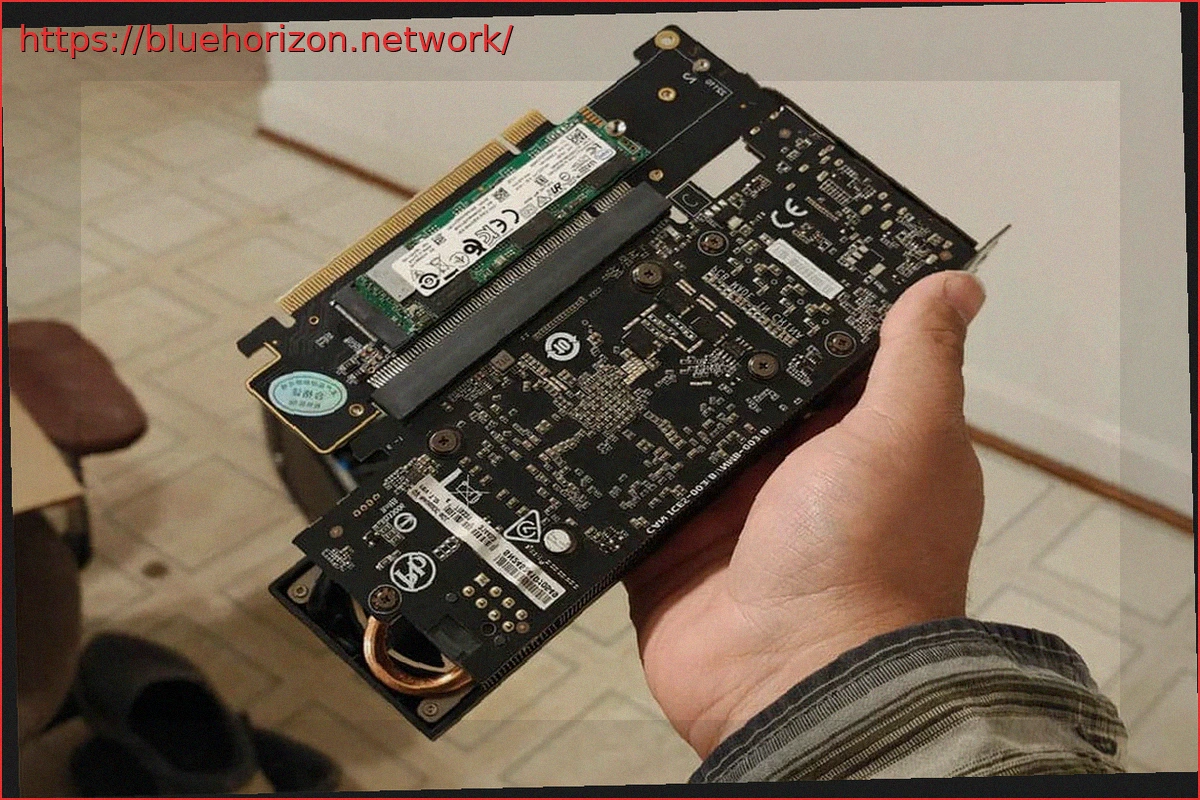
If you’ve opted for a Small Form Factor (SFF) PC or a chassis that only accepts mini-ITX motherboards, you’ve likely encountered the challenge of fitting standard-sized components. This often forces compromises, such as opting for smaller CPU coolers, mini-ITX graphics cards, or even low-profile GPUs, as full-size cards simply won’t fit in some cases. Imagine then deciding to upgrade your case or PC and wanting to reuse those graphics cards, but wishing they were full-size. Well, the RIITOP Dual PCIe adapter allows you to convert Low Profile graphics cards to standard size, and additionally, it adds 2 M.2 SSD slots.
Low-profile graphics cards are purchased by a small minority of users, and sometimes not even for gaming. Consider buying an SFF computer like the typical inexpensive office PCs from Dell or HP. These are economical even in these times of high RAM prices precisely because they are older, low-end machines. They often include Intel Core processors from a few years ago with integrated graphics that can barely handle basic tasks. Remember those old Intel HD integrated graphics? We’re not even talking about gaming here; even in applications, they were very, very sluggish.
The RIITOP Dual PCIe Adapter Allows You to Connect a Low Profile Graphics Card to Have it in Full Size and Also 2 M.2 SSDs
If you’re one of those who bought a low-profile graphics card at some point and don’t use it due to its form factor, there’s now an adapter that will convert it to a normal size and provide more storage space in the process. It’s a 2-in-1 adapter considering its dual functionality. On one hand, it increases the height of the graphics card to accommodate a standard size, acting as a riser, and it also allows you to add 2 M.2 SSDs. Furthermore, the biggest advantage of the RIITOP Dual PCIe Adapter is its excellent price, costing just $27 (approximately 23 euros).
For slightly more than the cost of a GPU riser, you get this plus an M.2 to PCIe adapter. Instead of using two separate adapters, you have an all-in-one solution. You can find it on Amazon for this price, and it supports SSDs of all sizes (30, 42, 60, 80, and 110 mm). On Reddit, users have tested the adapter using an RTX 4060 along with a WD Green SSD and an Intel SSD. One user even went as far as connecting an M.2 to PCIe adapter in one of the M.2 slots, allowing them to connect an RTX 3060 for use with Lossless Scaling while the RTX 4060 handled running the game.
To function, PCIe bifurcation from PCIe 4.0 x16 to 8x/4x/4x is required via your motherboard’s BIOS
This is the first dual solution we’ve seen that offers both features without costing a lot of money. To achieve this, it utilizes PCIe bifurcation. Although the adapter works with a PCIe 4.0 x16 connector, to provide bandwidth to the other devices, you’ll need to bifurcate those lanes. In your motherboard’s BIOS, you can select x8/x4/x4 for the x16 slot where you’ll connect the adapter. This will provide the equivalent of PCIe 4.0 x8 for the graphics card and two x4 channels for the SSDs, allowing them to operate at maximum speed.
You might think PCIe 4.0 x8 is a limitation compared to the typical x16, but remember that mid-range graphics cards like the RTX 4060 operate at x8 at maximum load. Moreover, if you use a high-end graphics card, you won’t see practically any loss. Even an RTX 5090 only loses 1% or 2% when connected to PCIe 4.0 x8, which in turn is equivalent to PCIe 3.0 x16 in bandwidth.
The main criticisms concern the complexity of getting it to work, although if you’re accustomed to using PCs and BIOS, changing the configuration will be very straightforward. On the other hand, some motherboards may not allow x8/x4/x4 bifurcation, so it’s worth checking beforehand.