Months have passed since Valve announced its new peripherals and console-PC (Steam Machine, Steam Frame, and Steam Controller), but fortunately, the first device is finally here. The Steam Controller is set to launch on May 4th, and there’s immense hype surrounding this controller, generating more enthusiasm within the gaming community than any other. Therefore, we will proceed to review Gamers Nexus’s assessment of the Steam Controller to see if its latency, battery life, connectivity, and features justify the significant interest gamers have shown.
When choosing a new controller for PC gaming, most people opt for an Xbox controller, primarily due to its native Windows support and compatibility with virtually all games. For Sony, older DualShock controllers required third-party programs, and while the DualSense has support in modern games, using Steam Input is necessary for compatibility in games where it’s not initially supported. Then there’s the new Steam Controller, which offers full support directly within Steam and even outside of it, combining Xbox-style buttons and triggers with Sony-like symmetrical joysticks. It will be released on May 4th for 99 euros.
Gamers Nexus Review of the Steam Controller: TMR Joysticks, Low Latency, and Great Battery Life
Gamers Nexus begins their review by highlighting the use of cutting-edge TMR technology in the joysticks. This technology not only prevents annoying drifting but also achieves greater precision and minimal response time with very low battery consumption. TMR offers an advantage over Hall Effect by reducing power consumption and is also superior to traditional joysticks, which eventually wear out and can move unintentionally. This type of technology is used in keyboards and has more recently been employed in high-end controllers.
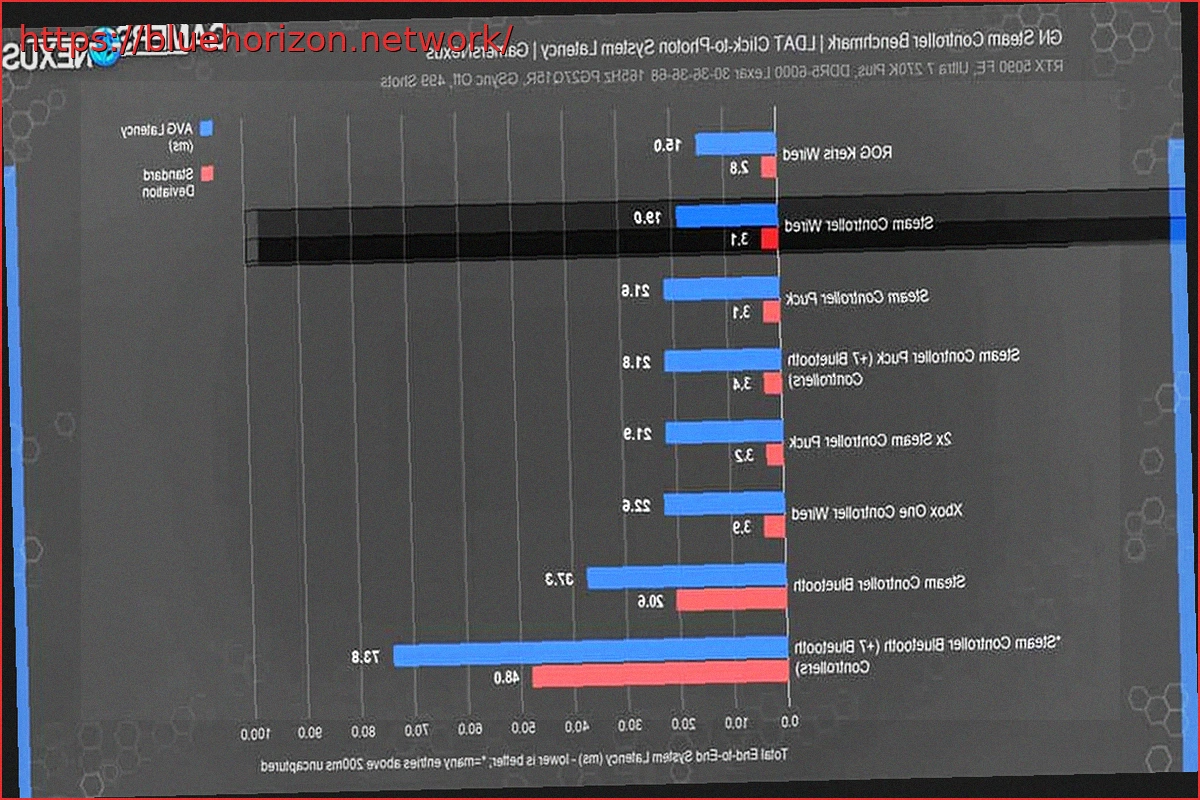
Now, we move on to one of the tests that generated the most interest from the gaming community: latency. Here, we have both good and not-so-good news. Starting with the best part, the Steam Controller’s latency is low, slightly outperforming the Xbox One controller. When connected via cable, the Steam Controller has an average latency of 19 ms and a deviation of 3.1 ms, while the Xbox One controller reaches an average latency of 22.6 ms and a deviation of 3.9 ms.
The most important finding is that the ‘Puck,’ which enables wireless play, adds minimal latency, with an average of 21.6 ms and a deviation of 3.1 ms. The less favorable news is that when playing via Bluetooth, the average latency increases to 37.3 ms with a deviation of 20.6 ms, which is noticeable. If 7 Bluetooth controllers are added, saturating the connection and causing interference, the results worsen to 73.8 ms latency and 48 ms deviation.
Moving on to battery tests, we have more good news. The controller lasted approximately 73 hours without vibration, and it’s estimated that with vibration activated, it will last between 1 to 2 full days (24 to 48 hours). This aligns with Valve’s estimates of 35 hours, and indeed, other reviews have achieved results between 30 and 35 hours with vibration enabled. Regarding charging time, using the Steam Deck charger, they managed to charge it from 0 to 100% in 3 hours and 26 minutes.
The Puck Provides Up to 45 Meters of Wireless Connectivity, the Controller is Easily Disassembled and Repaired, and All Controls are Customizable in Steam
In the next test, we encounter another of the Steam Controller’s strong points. The Puck, used for 2.4 GHz wireless connection, is much more stable than Bluetooth and maintains a signal up to 45 meters away (without obstructions) before the signal degrades. Another positive aspect is repairability, as the controller can be easily opened and disassembled, allowing for battery or other component replacements. Furthermore, they will collaborate with iFixit to provide tutorials.
Finally, we arrive at the concluding section where the controller is tested for its intended purpose: Steam. It’s impressive to see that absolutely all buttons and controls are customizable. Additionally, it is compatible with Steam Deck profiles, and the trackpads feature haptic feedback, similar to the Steam Deck, although they are noted to have greater precision and feel better than those on the Deck. Regarding ergonomics and comfort, this is entirely subjective, but it’s indicated that it might be uncomfortable for some players due to its large size (especially height) and the difficulty of reaching all buttons if you have small hands. Fortunately, it has 4 rear buttons that can be used without issue.